Working with the MELM Lottery Program
This description contains information on how to operate the MELM program correctly, what this program can do at all and which advantages you can gain
from it. It can therefore also be referred to as a user manual. The most important functions are presented one after another with screenshots. Take a bit of time and please go through all these points one by one; you will certainly be impressed by the program functions and the scope of the program!
At the beginning, however, one can feel simply overwhelmed by all these functions. To nevertheless get a clear overview, the following menu is additionally listed here, which corresponds to the program division and leads directly to the individual program sections of the latest version.
Via How to Use you can return to this page at any time. If you have not yet gained experience with lottery systems, please first read this introduction Lottery systems
: General information.
With the following link you will find a collection of frequently asked questions.
Operation and basic functions of the MELM lottery program
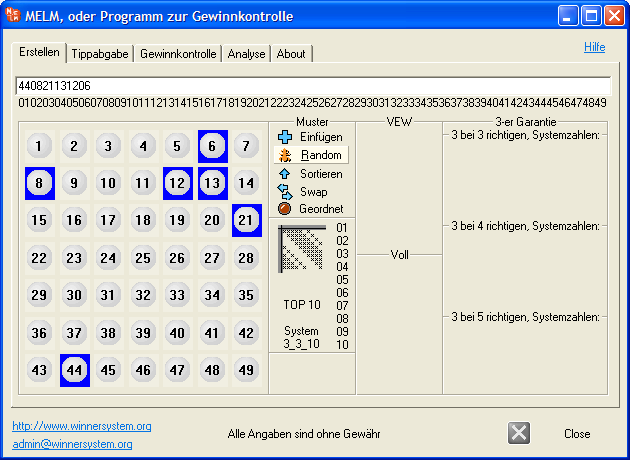
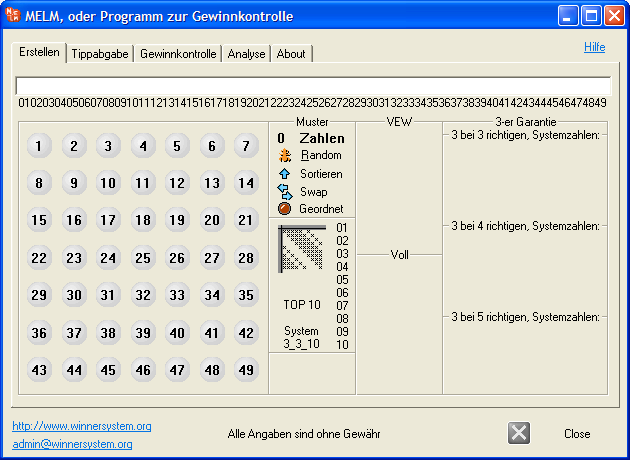
1) After starting the program, the “Create” section (tab in the upper program menu) is available. Here you can click your desired system numbers for the lottery system evaluation on the lottery grid, or alternatively enter them in text mode in the upper input field. Note that in text mode the numbers are represented with two digits, i.e., for number 9 use 09, numbers from 10 remain unchanged, and only numbers up to 49 are allowed (the first digit of a two-digit number can only be 0, 1, 2, 3 or 4!). The number of selected system numbers is shown on the right under “Pattern” and is updated in real time during input. The buttons for the lottery systems that can be generated with this number of system numbers are activated automatically.
back to top
Built-in lottery number generator (Mersenne-Twister)
2) Alternatively, you can use the very high-quality lottery generator built into the program (Mersenne-Twister pseudorandom number generator). To do so, click the ball with the desired number of random numbers to be generated, e.g., the lottery ball 6 for six numbers to be generated (or enter “06” in the upper text field in text mode, which leads to an identical result). Now press the ‘R’ key or click the “Random” button until your desired lottery number combination appears.
back to top
Manually adding individual lines (lottery fields)
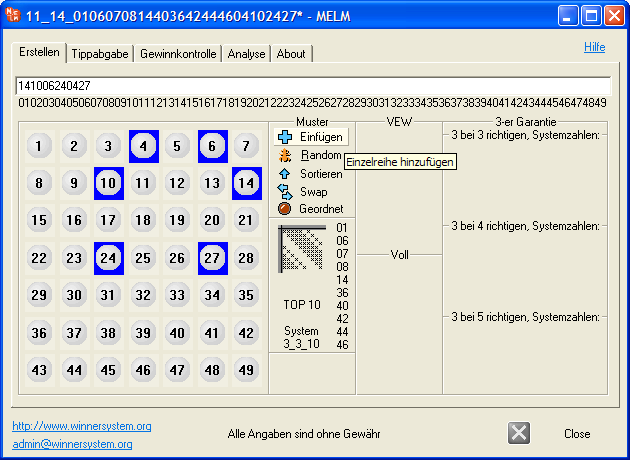
3) Once you have selected exactly 6 lottery numbers, the button “Insert” appears on the right, with which you can transfer this single line (=one lottery field on the standard ticket) into the program for evaluation and analysis. By clicking the “Random” button (or pressing the “R” key on the keyboard) multiple times, you can create a new random combination of 6 numbers each time.
back to top
Lottery generator - random creation of 2 up to 49 numbers
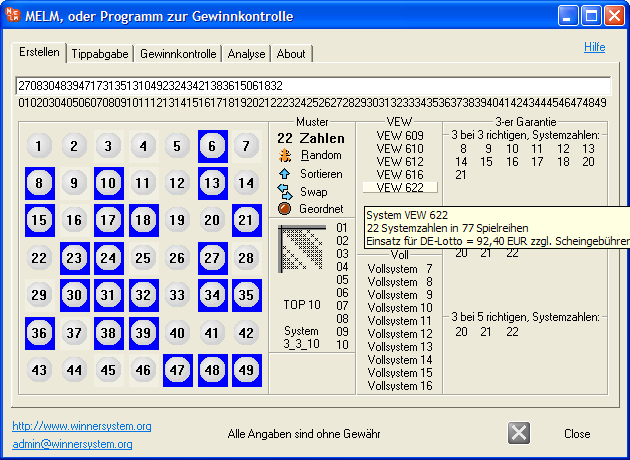
4) Of course, you can also have more than just six numbers generated with the lottery number generator built into MELM. If, for example, you clicked the ball 22, you would in the same way generate twenty-two random numbers that are needed for the partial system VEW622, as shown in the following screenshot.
back to top
Partial system 3-3-10 with one click (3 with 3 correct)
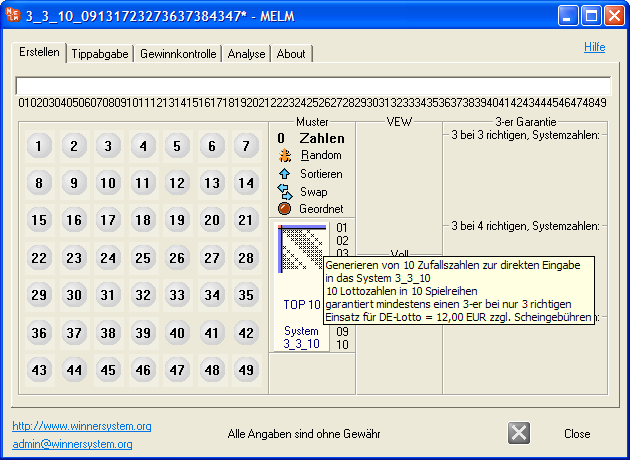
5) As another alternative to manual entry of desired numbers, the “TOP10” button is also available (see next screenshot). With a single mouse click, 10 random numbers are generated. An associated 3_3_10 system consisting of 10 lines is created and transferred to the program at the same time. The name of the current lottery system is shown in the program title; any previously loaded system is lost in the process. This is a “3outof3” guarantee system “10 numbers in 10 lines” (which can also be selected on the right under “3 with 3 correct”).
This system also has a “4outof6” guarantee and is comparatively cheaper than the official VEW 609 system (VEW 609 also has a “3outof3” guarantee, but has only 9 system numbers and consists of 12 lines). You can read more about this and other systems under
Lottery systems. If you want to generate not 10 random but 10 very specific numbers, please select these numbers first and then use the button “3 with 3 correct, 10 system numbers” on the right, which creates an identical system.
back to top
Online submission to lotto.de and lottobay.de
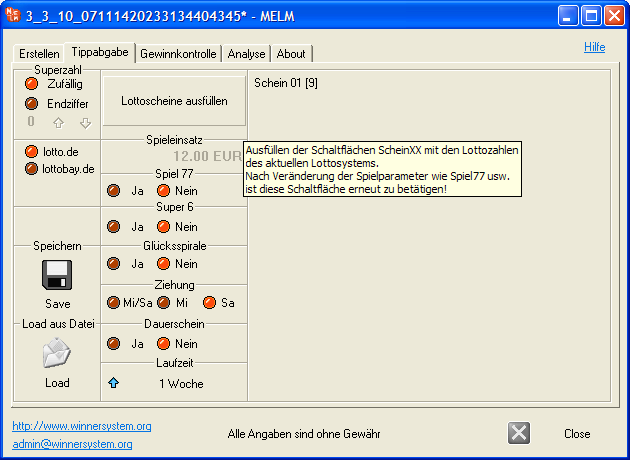
6) After clicking the desired lottery system, it is automatically transferred to the next tab “Submission”, as the screenshot shows. With MELM, you can conveniently and — most importantly — error-free submit your tips to the joint portal of the sixteen state lottery companies lotto.de (=direct play with the state lottery companies, maximum security), or play via the private, state-licensed retailer lottobay.de (which forwards your tips to the state companies).
You only need the MELM program on your local computer, which should then also be connected to the internet. Further processing then takes place via the providers’ online platforms. Error-free submission works as follows: The corresponding “Ticket XX [Y]” buttons to be clicked are automatically filled with the numbers of the current system by pressing the “Fill tickets” button and activated according to the number of lines in the system. When clicked, these tickets are placed in the shopping cart of the selected provider (online transfer).
For detailed instructions, please click here:
Convenient submission to the online retailers lotto.de and lottobay.de with the MELM software.
back to top
Online update of current numbers and prize amounts
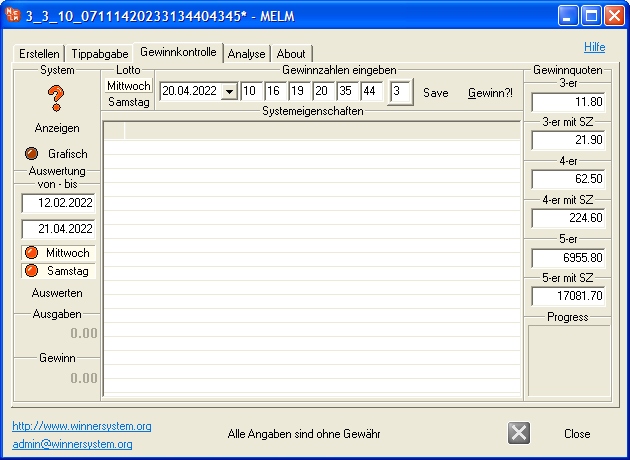
7) Result checking: This program
is very user-friendly; you can either enter the winning numbers and prize amounts yourself (also the ticket price and the respective processing fee
per ticket, 12 plays) or use the lottery numbers and prize amounts of the last 3 draws (from the “Date” combo box) or, as already
described under Analysis, download current lottery numbers and prize amounts via the internet. You also have the option of downloading the numbers including prize amounts from 2011 onwards by entering the respective date directly (Wednesdays or Saturdays!).
You can of course also save the determined winning numbers
and prize amounts; simply click the “Save” button; or enter in the combo box the date of the draw (important: 10 characters!) and the corresponding numbers as well as prize amounts
and then press the “Save” button once. Saving on the day of the draw is not possible because the prize amounts are not yet known (no prize amounts, only a “-” sign). As the results of the check, the standard amounts are then used; the total win is not shown at the bottom left. By clicking the “Reset” button (either “Save” or
“Reset” available) you can, if desired, also save the average prize amounts. You can then select this combination with the corresponding prize amounts from the combo box!
back to top
User-friendly evaluation and result checking
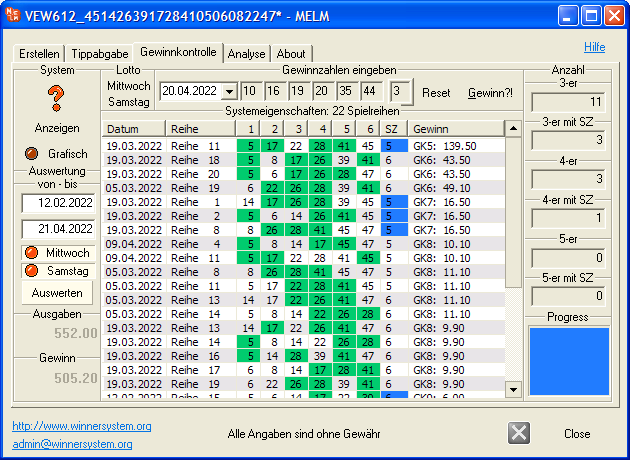
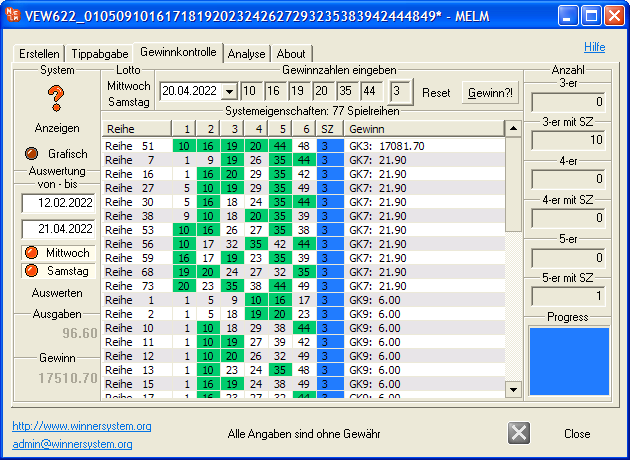
8) By clicking the “Win” button, the result check is carried out; the correct numbers are marked in green and the super number in blue. You can also sort your wins (as shown in the next screenshot) by clicking the “Win” column in the “System properties” field; the order of the columns can also be changed with the mouse (dragging).
The screenshot shown comes from a VEW 622 system with 77 lines. In the “Progress” field you can see the progress of the analysis. You can also enter the price of a line and the processing fee for accurate accounting (these are also saved when you click the “Save” button).
The wins are then assigned to the prize tiers; the actual wins and expenses are calculated accordingly. On the left, the total expenses and total win are calculated; on the right, the number of wins per prize tier is listed. By clicking the “Reset” button you can correct the
online updated prize amounts if necessary; for new winning numbers, the average prize amounts are initially entered. You can of course also save the new winning numbers on the day of the draw;
to do this, enter the date of the drawing in the combo box (important: 10 characters!) and the corresponding
winning numbers (leave the automatically entered average prize amounts) and then press the “Save” button once. You can now select this combination and the associated prize amount from the combo box!
back to top
Convenient lottery evaluation (incl. prize amounts)
9) Since version 7.24 you now have the option to evaluate your lottery numbers over a longer period (slowed and up to 10 weeks in the unregistered version, or since our archive creation for rule changes on 04.05.2013 in the registered program). First select the desired evaluation period (important: 10 characters in each date field!) and then the desired draw days (participation only on Wednesday, only on Saturday, or on both). Then press the “Evaluate” button. Similar to the “Win” button, the result check is carried out one after another for each individual draw of the period; the winning numbers are marked in green and the super number in blue. Total expenses and total win are calculated automatically. The price of a line (1.20 EUR) and the processing fee preset in MELM (0.60 EUR per ticket with 12 fields) can be changed via the configuration file melm.cfg if necessary.
back to top
Changing a system’s numbers (Swap)
10) For any loaded
system you can change the system numbers it contains (Swap). The function is used, for example, to create multiple similar systems for a syndicate so that no identical lines are played.
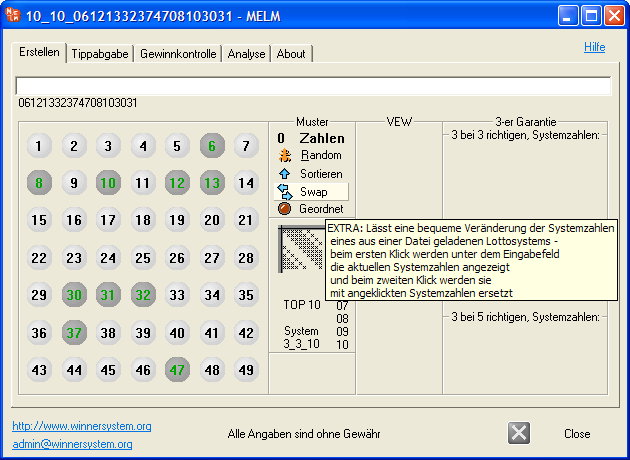
After clicking the “Swap” button, the system numbers of the current loaded system are displayed, see screenshot (you may need to save your system beforehand and load it again).
Now select the same number of new system numbers; these are accepted after clicking the same button again. For more details on this procedure (three individual steps), please refer to the detailed description of changing system numbers.
Please note that on this page we have presented only the basic functions of the MELM program in the form of a (very!) brief summary. For exact details, we refer to our individual subpages (submenu at the top of this page), which correspond to the program’s tabs and offer more detailed information about the individual functions. In particular, the functions of the unique lottery system analysis should be explicitly mentioned here.